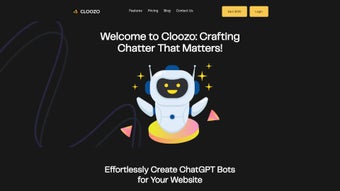

Download Cloozo – AI Chatbot Builder, Custom Bot Creator
Overview
Cloozo is a subscription‑based AI platform that empowers anyone—from solo entrepreneurs and small‑business owners to large agencies and seasoned developers—to build fully‑customized chatbots for websites, mobile applications, and even desktop environments. The service removes the technical barriers that traditionally accompany AI development by providing a visual editor, drag‑and‑drop workflow, and a straightforward data‑training interface. Users simply feed the bot with content scraped from their own website, PDFs, CSV files, or plain‑text documents, allowing the chatbot to speak in the exact tone, terminology, and knowledge base of the business.
Because each chatbot can be linked to its own OpenAI and Pinecone API keys, Cloozo delivers both performance flexibility and granular security, making it a compelling choice for privacy‑conscious organizations that need to keep client data isolated. Three tiered plans—Mercury, Earth, and Jupiter—offer unlimited character usage and unlimited custom datasets, ensuring that even the most data‑heavy projects stay within budget while retaining full scalability. Whether you need a quick FAQ assistant for a boutique store, a sophisticated lead‑generation bot for a multi‑channel marketing agency, or an internal help desk for a global enterprise, Cloozo provides a secure, user‑friendly, and highly extensible solution that can grow alongside your business needs.
Its cloud‑native architecture guarantees low latency, while its GDPR‑compliant hosting reassures European customers that their data is protected at every stage of the conversation pipeline.
Key Features & Benefits
- Visual Bot Designer: Intuitive drag‑and‑drop canvas lets you shape conversation flows without writing a single line of code.
- Data‑Driven Training: Import website pages, PDFs, CSVs, or plain text to teach the bot the exact language of your brand.
- Custom API Keys: Assign individual OpenAI and Pinecone keys per bot for isolated usage limits and enhanced data security.
- Unlimited Characters & Datasets: All three pricing plans remove character caps, allowing massive conversational histories and extensive knowledge bases.
- Multi‑Platform Deployment: Export bots as embeddable widgets for websites, or as SDKs for iOS, Android, and desktop applications.
- Brand‑Centric Styling: Choose colors, fonts, avatar images, and animation styles to match your visual identity.
- Analytics Dashboard: Real‑time metrics on user interactions, intent recognition, and conversion rates help you iterate quickly.
- Multi‑User Collaboration: Teams can share projects, assign roles, and review bot performance together.
- Scalable Architecture: Powered by OpenAI’s language models and Pinecone’s vector search, Cloozo scales from a single support bot to enterprise‑wide virtual assistants.
- Secure Hosting & GDPR Compliance: All data is encrypted at rest and in transit, with options to host in EU data centers for compliance.
Why Those Features Matter
The visual designer eliminates the steep learning curve associated with traditional chatbot development, letting marketers prototype in minutes rather than weeks. Data‑driven training ensures that the bot answers questions with the exact phrasing and policy nuances that your customers expect, reducing friction and increasing trust. By allowing each bot its own API keys, Cloozo prevents a single compromised key from exposing all your bots, a critical safeguard for agencies managing multiple client projects.
Unlimited characters and datasets remove the “out‑of‑budget” ceiling that plagues many SaaS chatbot solutions, making Cloozo a future‑proof investment as your content library grows. The analytics suite turns raw conversation logs into actionable insights, enabling continuous improvement and measurable ROI. Finally, the multi‑platform deployment options mean you can maintain a single source of truth while delivering a consistent experience across web, iOS, Android, and desktop environments, saving both development time and maintenance overhead.
Installation, Usage, Compatibility & Pros / Cons
Getting Started in Three Simple Steps
- Create Your Account: Visit the Cloozo website, choose a plan (Mercury, Earth, or Jupiter), and complete the secure checkout. You’ll receive a confirmation email with a personal dashboard link.
- Set Up a New Bot: From the dashboard, click “Create Bot,” give it a name, and select a template (FAQ, Lead Capture, E‑commerce, etc.). The visual canvas loads instantly in your browser—no download required.
- Feed Your Data: Use the “Import Sources” panel to connect a live website URL, upload PDFs, or paste plain text. Cloozo automatically parses the content, creates vector embeddings via Pinecone, and maps them to conversational intents.
Deploying the Bot Across Platforms
After training, click “Publish.” Cloozo generates a short JavaScript snippet for web embedding, or you can download native SDKs for iOS (Swift), Android (Kotlin), React Native, or Electron for desktop. Paste the snippet just before the closing tag on any page, and the chatbot will appear in the corner with the branding you selected. For mobile apps, follow the SDK’s README to import the library, initialize it with your bot’s unique ID, and you’re ready to go. The process typically takes under 30 minutes for a basic bot and under two hours for a more complex, multi‑language deployment.
System Compatibility
Cloozo is a cloud‑native service, so the only client‑side requirement is a modern web browser (Chrome, Edge, Firefox, Safari) with JavaScript enabled. The backend runs on highly available servers that support the following operating systems:
- Windows 10/11
- macOS 12 Monterey and later
- Linux (Ubuntu 20.04+, Debian, Fedora)
- iOS 14+ (via native SDK)
- Android 9+ (via native SDK)
Because the heavy lifting—language model inference and vector search—is performed on Cloozo’s servers, your local hardware specifications have little impact on performance. All you need is a stable internet connection and a browser that supports modern JavaScript standards.
Pros & Cons
Pros
- Zero‑code visual builder accelerates time‑to‑market.
- Unlimited characters and datasets eliminate hidden fees.
- Individual API keys per bot boost security for agencies.
- Cross‑platform deployment (Web, iOS, Android, Desktop) from a single source.
- Rich analytics turn conversations into measurable business outcomes.
- GDPR‑compliant hosting reassures European customers.
- Multi‑user collaboration streamlines teamwork and version control.
- Scalable architecture supports both small bots and enterprise‑wide assistants.
Cons
- Subscription pricing may be higher than basic rule‑based chatbot services.
- Advanced customization (e.g., custom middleware) still requires developer assistance.
- Reliance on OpenAI and Pinecone means occasional API rate‑limit constraints during peak usage.
- No on‑premise deployment option for ultra‑sensitive data environments.
- Learning curve for data‑import best practices can be steep for non‑technical users.
Frequently Asked Questions
Can I use Cloozo without any programming knowledge?
Yes. The visual bot designer lets you create conversation flows by dragging and linking nodes. You only need to upload your content, choose responses, and style the widget. No coding is required for basic to intermediate use cases.
What happens to my data after I upload it to Cloozo?
All uploaded files are encrypted at rest and in transit. Cloozo stores embeddings in Pinecone’s secure vector database, which is GDPR‑compliant for EU customers. You can delete a bot and all its associated data at any time from the dashboard.
Is there a free trial or a free tier?
Cloozo offers a 14‑day free trial with full access to all features, allowing you to build and publish a bot without entering payment details. After the trial, you’ll need to choose one of the paid plans to keep the bot active.
Can I integrate Cloozo with my existing CRM or ticketing system?
Yes. Cloozo provides webhook endpoints and REST APIs that can push conversation data to popular CRMs (HubSpot, Salesforce) or ticketing platforms (Zendesk, Freshdesk). You can also use Zapier or Integromat for no‑code integrations.
How does Cloozo handle multiple languages?
Cloozo leverages OpenAI’s multilingual models, allowing you to train a single bot on documents in different languages. You can also create separate bots per language, each with its own dataset and API key, ensuring accurate responses for a global audience.
What support options are available if I run into issues?
Cloozo offers 24/7 email support, a live chat widget within the dashboard, and a comprehensive knowledge base with step‑by‑step tutorials. Premium plan subscribers also receive priority support and a dedicated account manager.
Conclusion & Call to Action
Cloozo stands out in the crowded AI chatbot market by combining a no‑code visual builder with the raw power of OpenAI and Pinecone. Its unlimited character policy, per‑bot API keys, and robust analytics make it a strategic investment for businesses that need scalable, secure, and brand‑consistent conversational agents. While the subscription cost may be higher than basic rule‑based bots, the productivity gains, reduced development time, and higher conversion rates typically offset the expense for agencies and growing enterprises. If you’re ready to replace static FAQ pages with an interactive, intelligent assistant that can learn from your own content, download Cloozo today, start the free trial, and launch your first custom chatbot within minutes.



.png)



